Tickets
The Tickets module is the service and issue-management workspace in ZeyOS. It combines customer context, work status, communication history, and optional commercial follow-up in one record.
What This Page Is For
Use Tickets when work originates from a support case, service request, bug report, complaint, or other externally driven issue that needs a clear lifecycle.
What You See on the Page
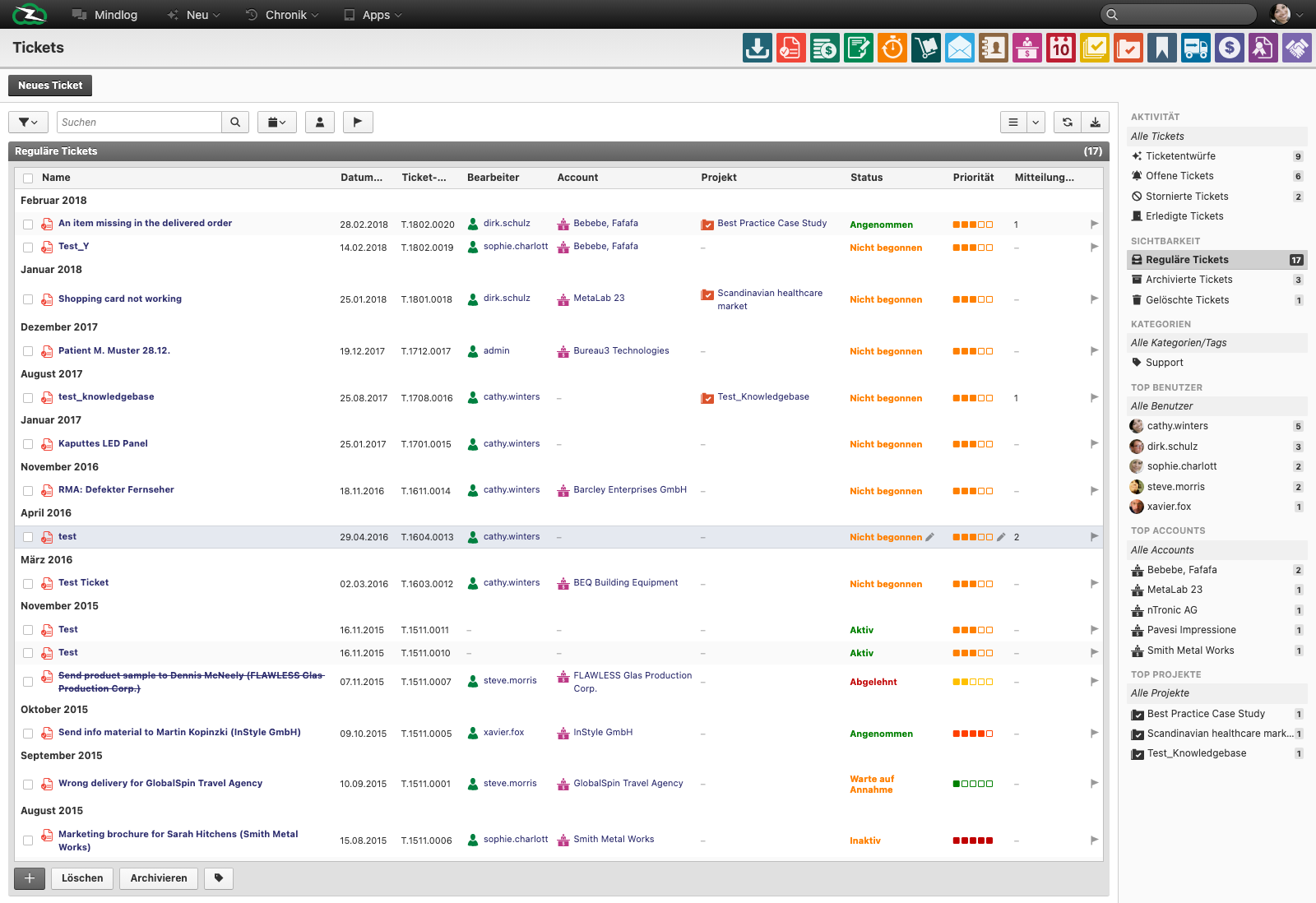
The live ticket list includes fields such as:
- Name
- Date
- Ticket No.
- Assignee
- Account
- Project
- Status
- Priority
- Messages
The module also includes:
- a New Ticket action
- activity filters for drafts, open, cancelled, and completed tickets
- visibility, category, top-user, and top-account filters
- bulk actions such as archive or delete
Tickets vs Tasks vs Action Steps
- Ticket = a service or support case
- Task = a formal delivery work item
- Action Step = a smaller operational follow-up
Use a ticket when communication, customer context, and case history matter. Use a task when the work is mainly delivery or internal execution. Use an action step when the follow-up is smaller than a full task.
Typical Workflow
- Create the ticket and assign the responsible user.
- Link the correct account, project, or main reference.
- Describe the issue clearly and set a realistic priority and status.
- Use messages, linked tasks, or action steps to coordinate the work.
- Add invoice or procurement items if the service case has commercial implications.
- Close, fail, cancel, or book the ticket according to the actual outcome.
Status and Priority
Ticket workflows vary by process, but typical states include:
- Not Started
- Accepted
- Active
- Feedback Required
- In Review
- Completed
- Failed
- Booked
The priority field is used to help teams distinguish routine work from urgent escalation. Consistency matters more than the exact scale label.
Ticket Detail Structure
In practice, tickets often bring several work areas together:
- master data and issue description
- linked tasks or action steps
- messages or internal communication
- invoice items for billable work
- procurement items for external cost tracking
That combination is what makes tickets different from generic tasks.
Best Practices
- Keep the ticket title specific enough to understand the issue without opening it.
- Link the right account from the start so ownership and reporting stay clean.
- Keep communication inside the ticket when possible instead of splitting context across email threads.
- Use tasks for larger execution work and keep the ticket as the case container.
- Reserve “booked” or final states for cases that are genuinely finished in your process.
Related Topics
- Managing Projects and Tasks - Use tasks for delivery work.
- Action Steps - Track smaller operational follow-ups.
- Messages & Mailing Lists - Communication context often starts there.
- Invoicing - Ticket work can become billable.
- Procurement - External cost items can be linked there.