Price Lists
The Price Lists module lets you define pricing that differs from the standard article price. This is useful when customers, partners, campaigns, or commercial segments require their own commercial conditions.
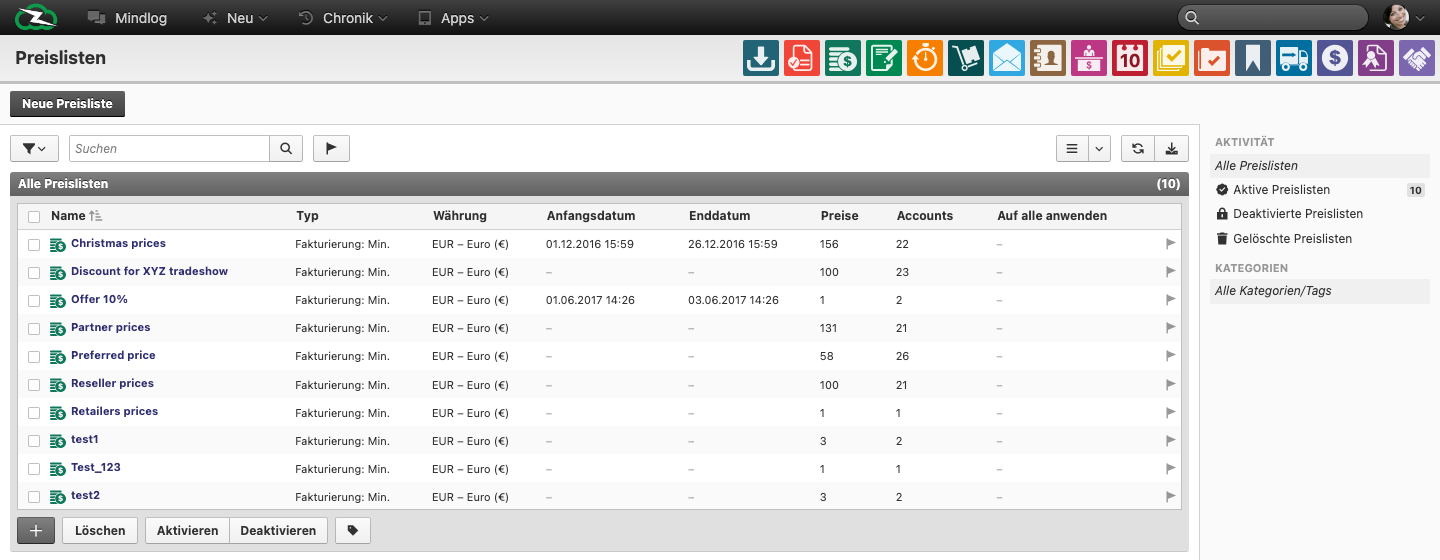
What This Page Is For
Use price lists when one article catalog must support different commercial pricing rules without changing the article master data itself.
What You See on the Page
The live list includes fields such as:
- Name
- Type
- Currency
- Start date
- End date
- Prices
- Accounts
- Apply to all
This makes it possible to see quickly whether a list is time-bound, account-specific, or broader in scope.
Typical Use Cases
Use price lists for:
- reseller pricing
- preferred-customer conditions
- event or promotion pricing
- temporary campaign prices
- account-specific overrides to normal article pricing
Common Price-List Patterns
Even if exact type labels differ by tenant configuration, teams usually work with a few recurring patterns:
- account-specific lists for named customers or resellers
- time-bound promotional lists with start and end dates
- broad overrides that apply to a larger commercial segment
This is why the Type column matters: it tells users whether the list is a narrow exception or a wider pricing rule.
How to Explain Price Lists Clearly to End Users
The clearest rule is:
- Article master data contains the standard price.
- Price Lists contain controlled exceptions or overlays.
That distinction helps users avoid editing article prices every time one customer needs a different deal.
Best Practices
- Name lists by commercial purpose, not by vague internal shorthand.
- Use start and end dates for temporary pricing instead of manual cleanup later.
- Keep account assignment intentional so the right price is applied to the right audience.
- Review old price lists regularly and deactivate obsolete ones.
Related Topics
- Inventory Management - Article master prices live there.
- Invoicing - Price lists affect customer-side transactions.
- Business Accounts - Account-specific pricing depends on the right account structure.