Managing Mailing Lists
Mailing Lists are reusable recipient groups for outbound communication. They bridge contacts, campaigns, and the Mailings area inside the Messages module.
What This Page Is For
Use Mailing Lists when the same message should be sent repeatedly to a maintained audience such as event invitees, campaign participants, customers, or internal groups.
What You See on the Page
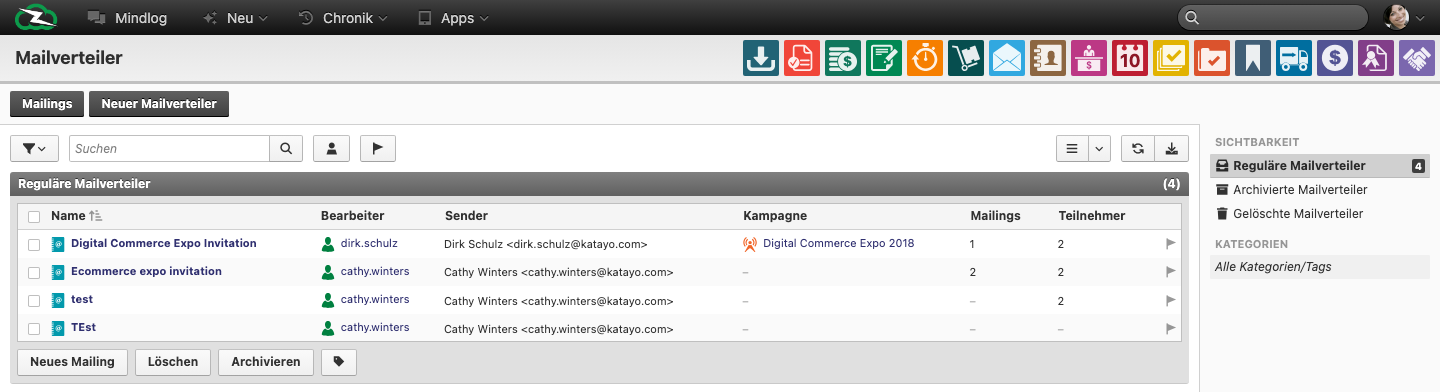
The live list includes fields such as:
- Name
- Editor / Assignee
- Sender
- Campaign
- Mailings
- Participants
The page also includes actions such as Mailings, New Mailing List, and New Mailing.
How Mailing Lists Fit into the Communication Model
- Mailing List = the reusable recipient structure
- Mailing = the concrete bulk message sent to that list
- Messages > Mailings = the mailbox area where sent bulk messages appear
- Campaigns = the broader marketing or outreach context that can be linked to a mailing list
Typical Workflow
- Create the mailing list.
- Choose the correct sender identity.
- Add participants.
- Link the list to a campaign if the communication belongs to a broader initiative.
- Start a New Mailing from the list when you are ready to send.
Where Participants Usually Come From
Depending on your tenant setup, participants can be maintained:
- manually
- from contacts or account selections
- from campaign-driven worklists
- from imports or maintained target groups
The important training point is that the mailing list stores the audience, while the mailing stores the outbound send itself.
When This Needs Clearer Explanation for Users
Users often confuse these steps:
- creating the list versus sending the mailing
- selecting the correct sender versus the participant audience
- linking a list to a campaign without assuming the campaign sends mail automatically
Best Practices
- Use stable, descriptive list names that reflect audience and purpose.
- Keep the sender identity explicit so replies and ownership are clear.
- Review participant counts regularly before sending.
- Use campaigns only when you need broader tracking around the outreach effort.
Related Topics
- Using the Inbox - Mailings are visible inside the Messages module.
- Campaigns - Campaigns can be linked to mailing activity.
- Managing Contacts - Contacts often become mailing participants.