Campaigns
The Campaigns module is the planning and tracking space for marketing or outreach initiatives in ZeyOS.
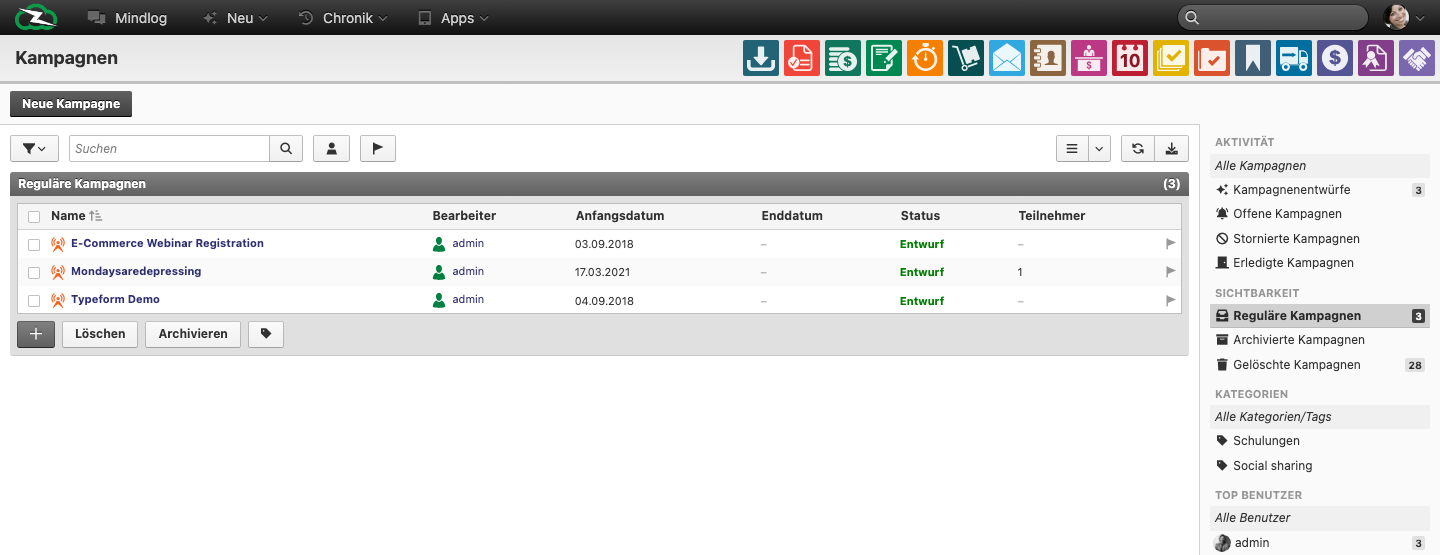
What This Page Is For
Use Campaigns when outreach activity needs a shared container with dates, ownership, participants, and evaluation context.
What You See on the Page
The live list includes fields such as:
- Name
- Editor / Assignee
- Start date
- End date
- Status
- Participants
The live filters distinguish between draft, open, cancelled, and completed campaign states.
Campaigns vs Mailing Lists
The clean distinction is:
- Campaign = the overall initiative
- Mailing List = the recipient structure
- Mailing = the concrete outbound message
A campaign may be linked to mailing activity, but it is broader than just one email send.
Typical Workflow
- Create the campaign and define ownership.
- Set start and end dates.
- Build or link the participant structure.
- Connect relevant mailing lists if email outreach is part of the campaign.
- Review resulting opportunities or feedback after execution.
Where Participants Usually Come From
Campaign participants are typically assembled from one or more of these sources:
- maintained contact selections
- linked mailing lists
- manually added target groups
- results of previous outreach or qualification work
The important distinction is that the campaign organizes the initiative, while mailing lists and mailings handle the actual audience and send operations.
Best Practices
- Name campaigns by business purpose, not only by internal shorthand.
- Keep dates realistic so reporting remains meaningful.
- Use campaigns to coordinate outreach, not to replace mailing lists or opportunities.
- Review participant counts and linked outreach before declaring a campaign active.
Related Topics
- Managing Mailing Lists - Recipient structures for campaign communication.
- Opportunities - Campaigns often feed pipeline work.
- Contacts - Campaign participation starts with clean contact data.