Invoicing
The Invoicing module is the sales transaction workspace in ZeyOS. It manages the commercial document flow from initial quote through order, delivery, invoice, and credit note.
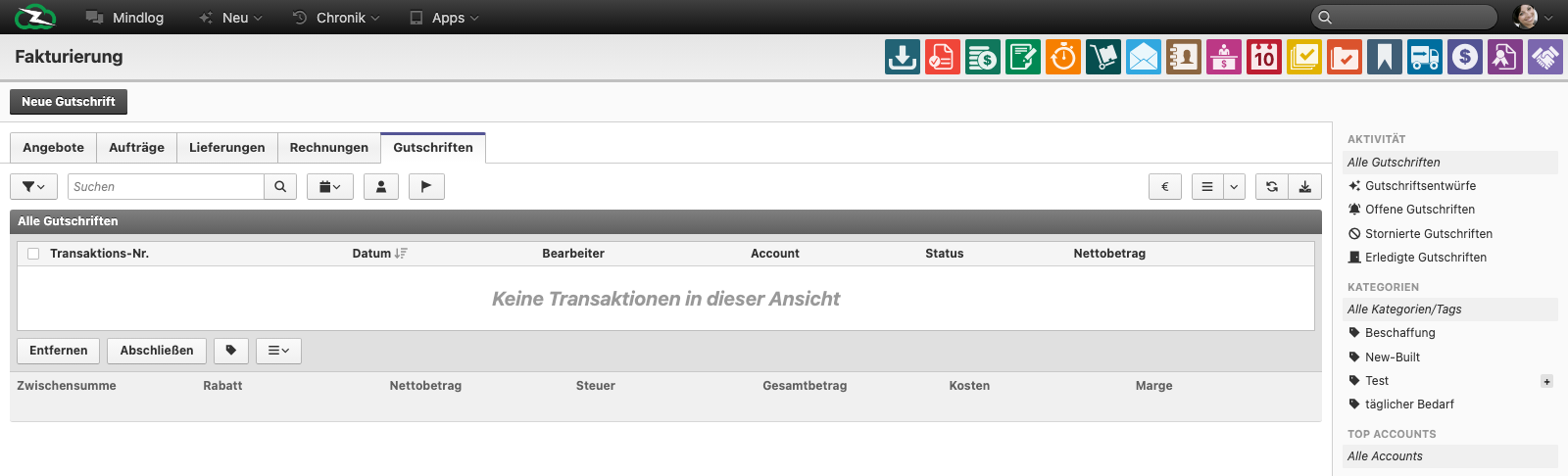
What This Page Is For
Use Invoicing when you need to create, convert, track, and complete customer-side sales documents.
Sales Document Flow
The module is organized around five document stages:
- Quotes
- Orders
- Deliveries
- Invoices
- Credit Notes
These document types are linked to each other so the final invoice can be traced back to the original sales process.
What You See on the Page
Across the transaction tabs, the live list uses fields such as:
- Transaction No.
- Date
- Assignee
- Account
- Status
- Net amount
The module also provides:
- a new-transaction action based on the active tab
- standard activity and account filters
- bulk actions for selected records
- a financial summary area for the currently visible transactions
Typical Workflow
- Create the quote.
- Convert the quote into an order when the customer accepts.
- Create the delivery when goods or services are fulfilled.
- Issue the invoice.
- Create a credit note when a correction, return, or refund is required.
The exact sequence depends on your business model, but the module is designed to preserve the chain between those stages.
Working with Transaction Data
Sales transactions usually combine:
- the customer account
- buyer and seller address data
- currency and due-date information
- line items from articles or services
- discounts, taxes, and totals
Users should understand that the transaction record is not just a printable document. It is also the operational source for later delivery, payment, and reporting.
Invoicing vs Payments vs Contracts
- Invoicing creates the sales documents.
- Payments record money movement against those documents.
- Contracts define recurring commercial relationships that may later generate invoices.
That separation helps users avoid treating invoices, payment records, and recurring agreements as the same object.
Best Practices
- Convert documents through the intended workflow instead of re-creating them manually.
- Keep the customer account and article data clean before creating transactions.
- Review status and net amount at list level before processing large batches.
- Use credit notes for corrections instead of manually rewriting closed invoice history.
- Train users on which stage is operationally binding in your process: quote, order, delivery, or invoice.
Related Topics
- Procurement - Supplier-side purchasing flow.
- Payments - Settle the resulting documents.
- Contracts - Recurring billing framework.
- Inventory Management - Article and stock data used in transactions.
- Business Accounts - Customer-side commercial master data.